WordPress Shortcode
Shortcode enable wordpress plugin developer to create special content (form,gallery,slideshow, etc) that users can easly attach to certain page/post.
|
1
|
[
shortcode_name
shortcode_parameter
]
|
Mostly shortcode was inserted into post/page. But actually we can also call shortcode within our theme directly. For example if you have a shortcode to call a gallery and you want the gallery to be displayed on top of your web page / landing page.
Insert a shortcode to theme is a bit tricky. Calling the shorcode is easy, the problem is where to put the shortcode. viagra without presc To properly insert a shorcode to desired position in your theme need a little HTML knowledge.
|
1
|
<
?
php
echo
do_shorcode
(
"[shortcode_name shortcode_attributes]"
)
|
Insert shortcode to your theme
Suppose you want to add a shortcode which call a slideshow plugin into the top of your blog. In this example i use my fluid responsive slideshow plugin as an example. The first thing you want to know is where to place the shortcode between your HTML code, the easiest
way to archive this is :
- Get google chrome (We need the chrome developer tool, any other browser with an inspector tool is ok but in this tutorial we gonna how often can you take viagra use chrome)
- Open your wordpress website
- Examine the position you want to insert
- Edit your theme file
The first two step is easy. The third step is a little bit tricky.After you get an idea of where the slideshow will go, do a right click on that area (on your google chrome browser) and select
inspect element
.
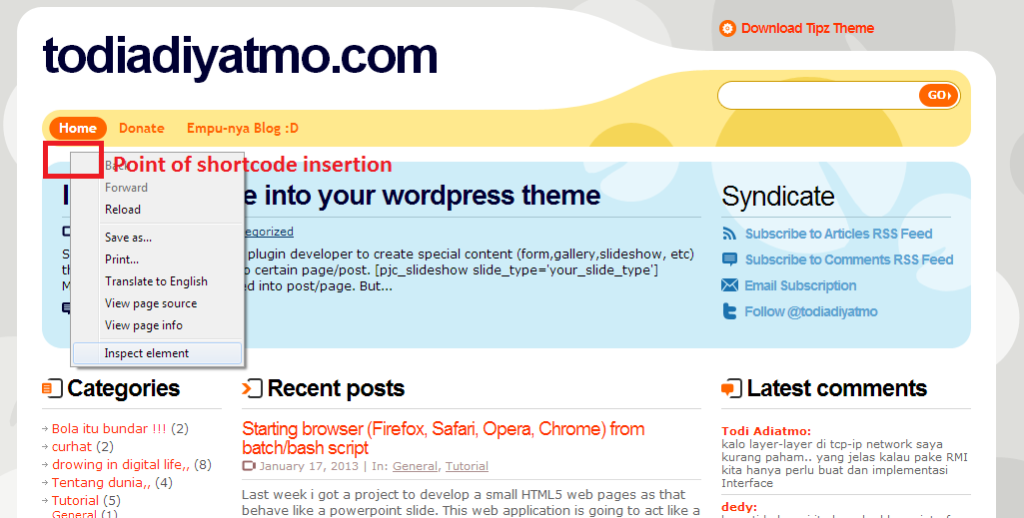
Now you will get information from the chrome developer tool about the structure of your website. The important think to now is about the id/class on that the nearest <div> within or click. <div> is stand for division which is one of the HTML markup that used to build our website. And on most <div> there is an id / class such as <div id=”main” class=”page”> to identify the div. If you want to learn more about this <div> stuff you can go into this tutorial .
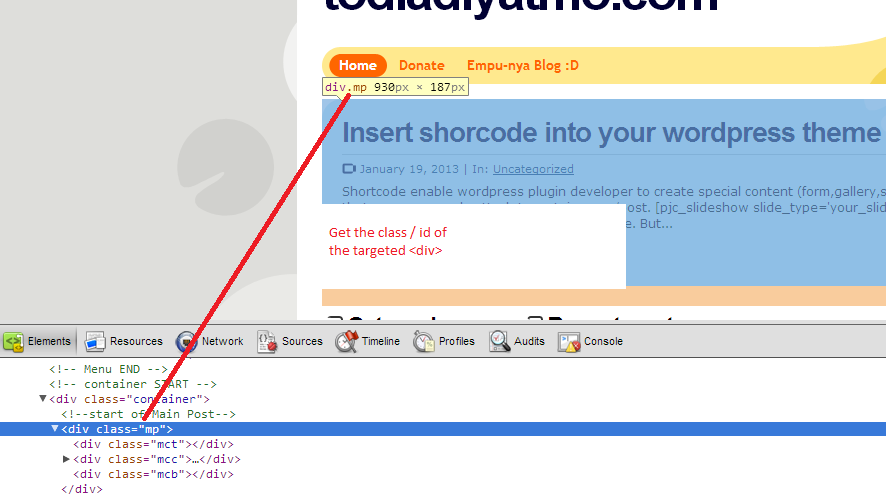
In the picture above, the closest div within my click is having class=”mp”. Now remember this <div>class as we going to insert the shorcode bellow/after the div . To edit your theme file go to your admin page, on the left sidebar choose : Appearance -> Editor.
Before we continue , i will notice you that editing your theme file can be dangerous. If you do something wrong ( ex: accidentallyerasing some tag ) your web would rendered incorectly or not working at all. Always make backup before you do any change.
Within the editor there is a lot of that used by your theme to render your web. . Everytime you load your website, wordpress would could index.php / home.php file depending on your theme structure. The general rule of thumb is : if there is a home.php file, your home / landing page structure is defined in this file but if the home.php dot not exist, you must check your index.php to find the home section. Index.php file must exist on every worpress theme file while home.php is optional.
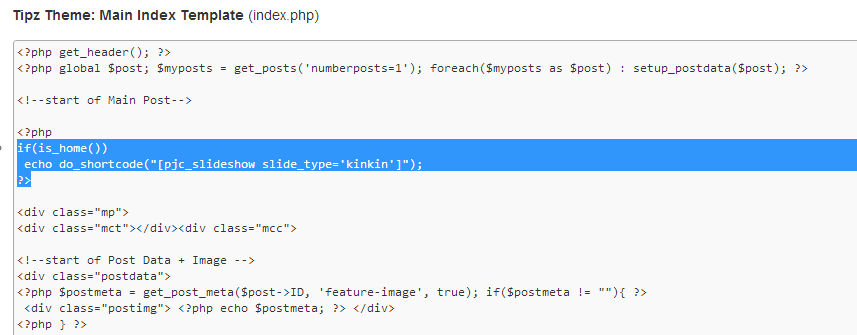
Now select the corresponding file within the editor(index.php / home.php). Look for the Id that we already got on us online pharmacy the third step, and insert this code :
The Shortcode
In my fluid responsive slideshow plugin the shortcode was : pjc_slideshow which has one attribute , the slide type. So for index.php the code would be :
|
1
|
<?php
if
(
is_home
(
)
)
echo
do_shortcode
(
"[pjc_slideshow slide_type='kinkin']"
)
;
?>
|
For home.php
|
1
|
echo
do_shortcode
(
"[pjc_slideshow slide_type='kinkin']"
)
;
|
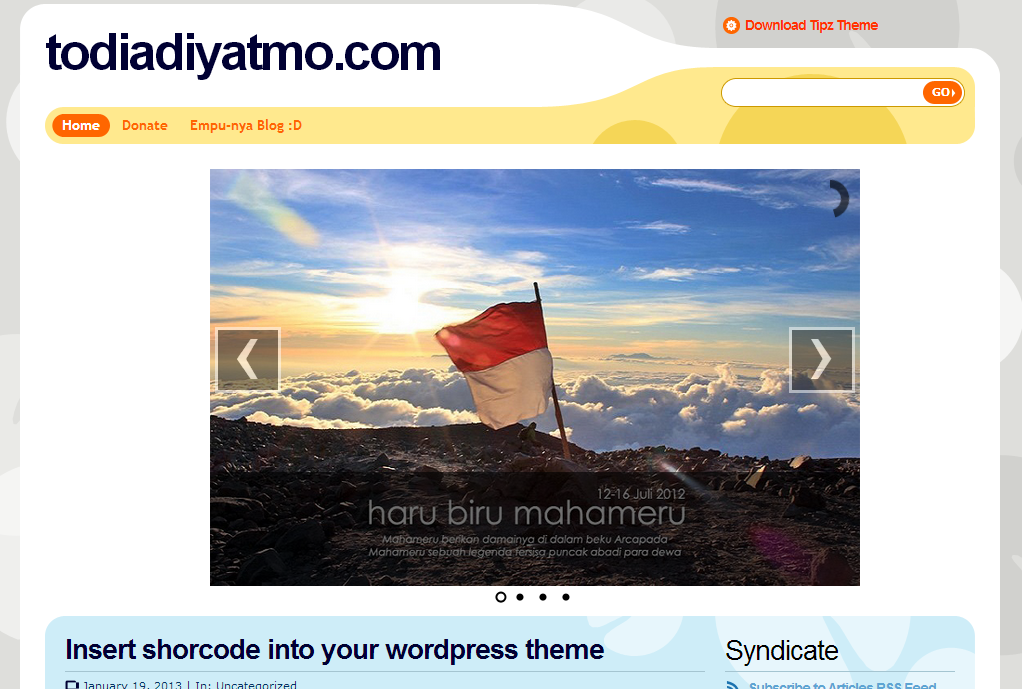
As you may see that on index.php case there is extra is_home() function to be called. The function is to make sure that the shortcode is only called on your home section. After adding those lines save your file and check the result by going back to your website. If all the step was done properly the shortcode should call the desired plugin. You may see that on most file there is a comment tag arround the <div> that help you to put the shortcode. Most themes have this comment, but some are not.
In some case maybe you need to add extra css style to make the plugin looks properly. But there’s beyond the scope in this tutorial.
I hope my small post is helpfull, If you need have any levitra comment or suggestion don’t hesitate to leave a comment or contact me on todi.adiatmo[at]yahoo.com
dpX2I9 If some one needs to be updated with most up-to-date technologies after that he must be visit
The the next time I read a weblog, Lets hope so it doesnt disappoint me as much as that one. What i’m saying is, I know it was my replacement for read, but When i thought youd have some thing interesting to say. All I hear is often a few whining about something that you could fix in case you werent too busy searching for attention.
https://intensedebate.com/people/boyergood44
Providing quality African Mangoo is very much imptortant to us.
https://zerodays.date/wiki/Edinburgh_Airport_Transfer_Services